The invitations go out. Then the questions start. Three parents reply “we’ll try.” One asks whether siblings can come. Two say nothing at all, and you only find out on the day, when you have ordered a cake for twelve and twenty children arrive. Anyone who has thrown a kids’ birthday party knows that the invitation is the easy part and the head count is the hard part.
This is a guide to sending birthday party invitations online in a way that brings the answers back to you, in one place, before you book the venue or order the food.
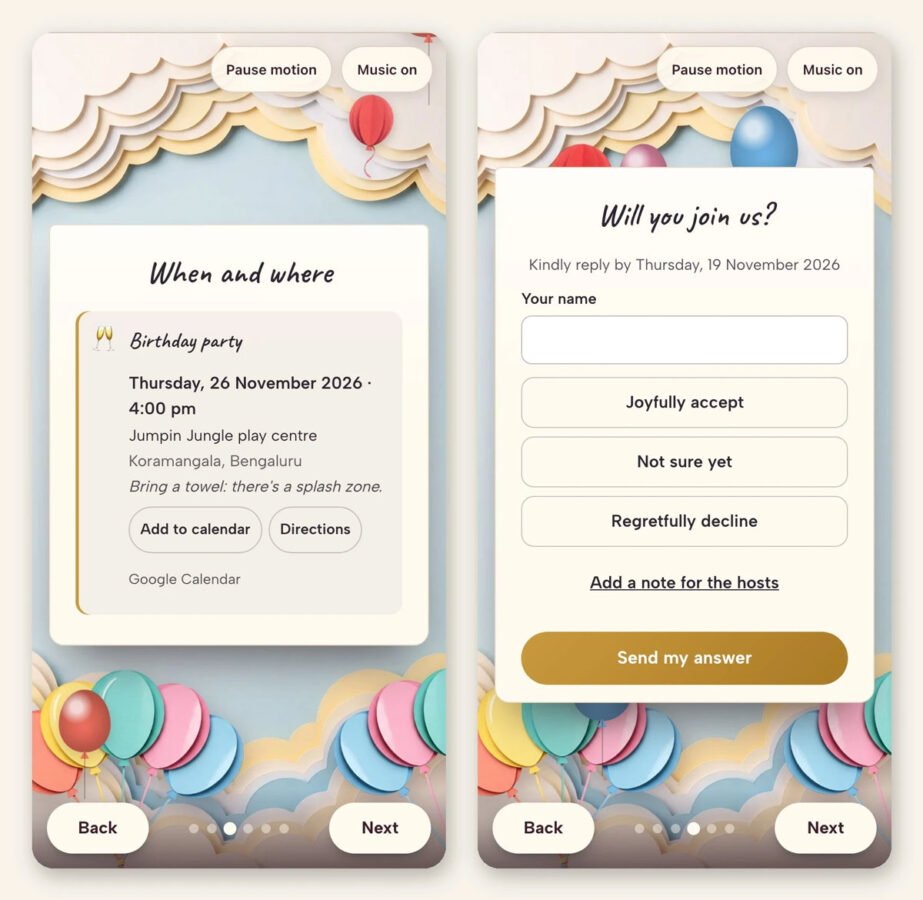
What a guest sees: the when-and-where page with Add to calendar and Directions, then the RSVP that asks how many are coming.
Why a photo of a paper invite in the group chat does not work
Most of us now invite by sending a picture of a card into a WhatsApp group or a class text thread. It is fast, and it is where the parents already are. The trouble is what happens next. Replies land in the chat, between someone’s question about the school fair and a reminder about swim kits. A “yes” from Tuesday is thirty messages up by Friday. Nobody says how many are coming. The ones who did not answer did not say no; they just did not see it.
The fix is not a different group chat. It is an invitation that collects the answers itself.
What a good online birthday invitation does
When you make birthday invitations online with a tool built for parties rather than a photo of a card, the invite becomes a small page that opens on the guest’s phone. Look for these five things:
- The details where they cannot be missed. The day, the time, the venue, and directions that open the map in one tap. Parents arriving at a soft-play centre they have never been to will thank you.
- A countdown. It sounds like a gimmick until a six-year-old opens the link every morning to see how many sleeps are left. It also keeps the party in the parents’ minds without you nagging.
- An RSVP on the invitation itself. Each guest taps coming or not coming and says how many are in their party. That is the number you actually need: a family of four is not one guest.
- A guest list that fills itself. Every answer is emailed to you and kept on a list with totals, so on Thursday night you open one page and read “14 coming, 3 not, 5 no answer yet” instead of scrolling a chat.
- Add to calendar. One tap puts the party in the guest’s own calendar. Fewer “sorry, what time was it again?” messages on the day.
One link per family, if you want to be fancy
A trick that works well for bigger parties: instead of one link for everyone, make a link for each family. The invitation then greets them by name (“The Patels, you’re invited”) and pre-fills their RSVP. It feels like a card addressed to them rather than a broadcast, and it makes the answers cleaner because each family’s reply is tied to their link. For a class party of twenty-five, that is the difference between a list you trust and a list you double-check by phone.
What to put in the message
Keep the words short; the details do the work. Three lines are plenty:
- Who is turning what: “Maya is turning seven!”
- What kind of party, so parents know what to send them in: “A pizza-and-pyjamas party, no need to dress up.”
- One practical line: “Drop-off is fine from age five; younger siblings welcome, just tell us in your RSVP.”
That last line is the one most paper invitations leave out, and it is the one that causes the most back-and-forth. If the RSVP asks how many are coming, you have answered the sibling question before it is asked.
After the party: the album
The other thing that gets lost in a group chat is the photos. Everyone took some; nobody collects them. A digital invitation with RSVP can also carry a shared album, so the same link the guests opened to say yes becomes the place where the pictures go afterwards. The parents who could not come get to see the cake, and you get all the photos in one place without asking anyone to upload anything to a drive.
A note on cost and on previewing first
Tools like this are usually priced once per event rather than per guest, which is what you want for a children’s party where the guest list grows as the week goes on. The one we built at MailMyCard is one payment for the whole guest list, with no subscription, and you can make the invitation and look at it exactly as a guest will before you pay anything. That preview step matters more than it sounds: it is where you notice the venue address is wrong, or that you wrote “Saturday the 14th” when the 14th is a Sunday.
The short version
Send one link, not one photo. Make sure the link has the map, a countdown, an RSVP that asks how many, and a list that totals the answers. Ask about siblings in the invitation so no one has to ask you. And give the guests somewhere to put the photos afterwards. The party will still be chaos. At least the numbers will be right.