You open the Wayback Machine, paste in a URL, and get back a blank white page — or worse, a snapshot that loaded the shell of a site but none of the actual content. Maybe the page was never crawled. Maybe the site owner blocked the Internet Archive via robots.txt. Maybe a GDPR Article 17 takedown quietly erased the snapshot you were counting on. Or maybe the Archive went down entirely, as it did for days during the October 2024 breach.

wayback machine alternative — Best Wayback Machine Alternatives in 2025
These aren’t edge cases. Researchers, journalists, lawyers, developers, and marketers run into these failures constantly. The Wayback Machine remains an impressive digital preservation project — over 860 billion pages archived since 1996 — but it was never built to be a reliable, on-demand web archiving tool for every scenario in 2025.
A strong wayback machine alternative exists for almost every use case, from court-admissible timestamped records to programmatic API access to JavaScript-rendered snapshots of React apps. What follows is a use-case-driven breakdown of the best internet archive alternatives — including a full feature comparison matrix and honest notes on where each tool falls short.
Why the Wayback Machine Falls Short
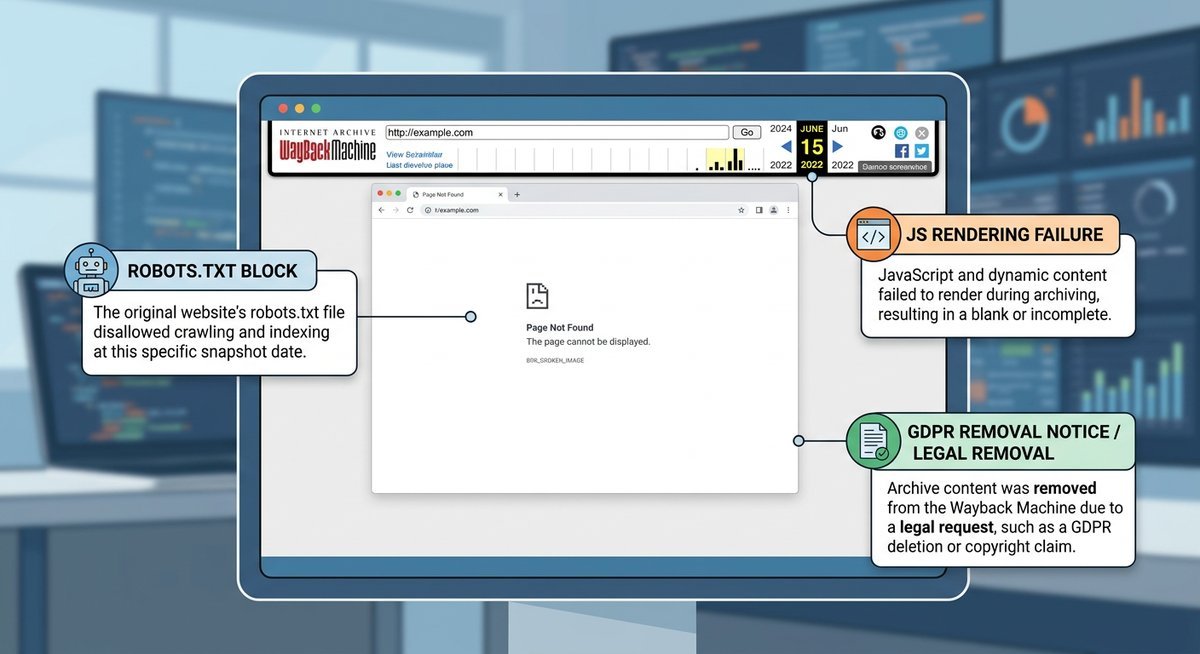
The Wayback Machine fails primarily due to five repeatable issues: robots.txt exclusions that erase entire domains from the archive, crawl gaps spanning months or years between snapshots, zero JavaScript rendering for modern SPAs, GDPR Article 17 deletions that remove snapshots without notice, and single-point-of-failure downtime like the October 2024 breach that locked out millions of users. Each of these pushes users toward specialized alternatives.
Crawl Gaps, robots.txt Exclusions and Rate Limiting
Any site owner can block the Internet Archive by adding a Disallow: / directive under the ia_archiver user-agent in their robots.txt file. The Archive honors these requests, which means entire domains can vanish from the historical record — often the exact domains users most want to investigate.
Even for sites that permit crawling, frequency is wildly inconsistent. Popular news sites get snapshotted multiple times daily. A mid-tier SaaS product page or a regional government portal might have gaps of six to eighteen months between captures. A pricing change, a retracted claim, or a complete redesign can disappear cleanly into that window.
CDN-served content makes things worse. Pages that assemble dynamically from edge nodes, or that sit behind a login wall, a cookie consent screen, or an IP-based paywall, are routinely captured as hollow shells. The crawler sees the container. The actual content never loads.
JavaScript Rendering, GDPR Takedowns and Downtime
Modern web applications built on React, Vue, or Angular don’t serve pre-rendered HTML. They serve a minimal shell that JavaScript populates after load. The Wayback Machine’s crawler fetches raw HTML without executing JavaScript, which means single-page applications frequently archive as blank white pages or broken layouts stripped of all meaningful content.
Legal exposure adds another layer. Under GDPR Article 17 — the “right to erasure” — individuals can request that the Internet Archive remove snapshots containing their personal data. The Archive complies with such requests, meaning a page that existed in the archive yesterday may be gone today with no redirect, no notice, and no replacement.
Availability itself is not guaranteed. The Internet Archive suffered a significant breach and extended outage in October 2024, leaving millions unable to access any archived content for days. One institution, one failure point, no fallback — a structural risk that no workaround inside the Wayback Machine can address.
| Failure Type | Root Cause | Who It Affects Most |
|---|---|---|
| robots.txt exclusion | Site owner opts out via ia_archiver directive | Researchers, journalists, legal teams |
| Crawl gaps (months/years) | Inconsistent crawl scheduling by domain priority | Anyone tracking page changes over time |
| Login/CDN-gated content | Crawler cannot authenticate or execute client-side logic | Developers, competitive intelligence teams |
| JavaScript/SPA blank pages | No headless browser rendering in crawl pipeline | Developers archiving modern web apps |
| GDPR Article 17 deletions | Legal compliance removes snapshots retroactively | Journalists, legal professionals |
| Extended downtime | Single institution, no infrastructure redundancy | All users during outage windows |
The Best Wayback Machine Alternatives Compared
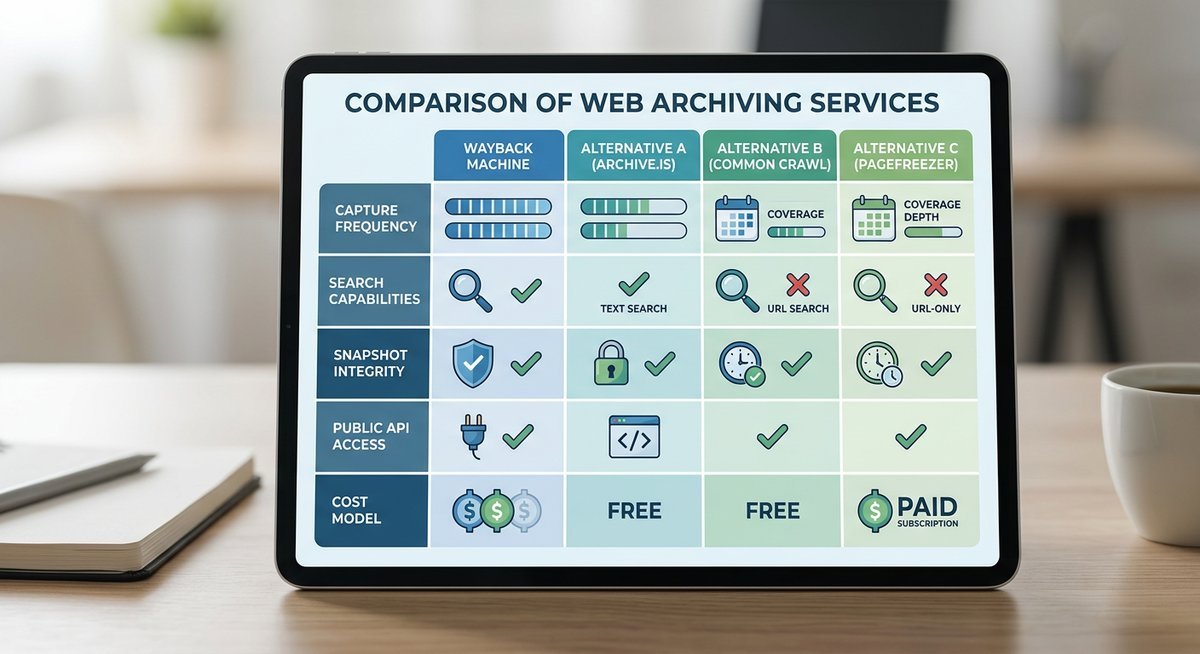
The strongest wayback machine alternative depends on what you need: legal-grade timestamping, JavaScript rendering, API access, or simple free snapshots. No single web archiving tool wins every category. The matrix below compares ten tools across pricing, SPA support, API access, browser extensions, export formats, and legal admissibility — a combination no single competitor resource currently offers.
Full Feature Comparison Matrix
A few notes before scanning the table. “JavaScript/SPA support” means the tool executes JavaScript and captures the rendered DOM — not just raw HTML. “Legal admissibility” indicates whether the vendor provides certified, tamper-evident records accepted in court proceedings. “Export formats” matter most for developers and compliance teams who need data portability beyond a screenshot.
| Tool | Free Tier | Paid (starting) | Snapshot Frequency | JS/SPA Support | API | Extension | Export Formats | Legal Admissibility |
|---|---|---|---|---|---|---|---|---|
| Archive.today | Yes (unlimited) | None | On-demand | Partial | No | No | PNG, HTML | No |
| Perma.cc | Yes (10/month) | ~$10/month | On-demand | Partial | Yes | No | WARC, screenshot | Yes (academic/legal) |
| Stillio | No | $29/month | Hourly to monthly | Yes | Yes | No | PNG, PDF | Partial (timestamped) |
| PageFreezer | No | Custom (enterprise) | Continuous/scheduled | Yes | Yes | No | WARC, PDF, MP4 | Yes (court-certified) |
| Conifer (Rhizome) | Yes (5 GB) | None currently | On-demand (interactive) | Yes (full browser) | No | No | WARC | No |
| CachedView | Yes | None | Search engine cache | No | No | Yes | HTML (cached page) | No |
| Visualping | Yes (5 pages) | $10/month | 5 min to weekly | Yes | Yes | Yes | PNG, PDF, email alerts | No |
| HTTrack | Yes (open source) | None | Manual | No | CLI | No | Full site mirror (HTML) | No |
| Urlbox | Free trial | $39/month | On-demand via API | Yes | Yes | No | PNG, PDF, HTML, WEBP | No |
| Webpage Archive | Yes | None | On-demand | Partial | No | No | Screenshot, HTML | No |
Tool Profiles at a Glance
Archive.today is the fastest free alternative to the Wayback Machine for one-off snapshots. No account required, instant captures, clean permanent URLs. The catch: no API, no bulk archiving, and partial JavaScript support means SPAs may still render incomplete.
Perma.cc was built by Harvard Law School’s Library Innovation Lab specifically for citation-grade archiving. Its records are hosted by a network of partner libraries, giving permalinks institutional durability that no other free tool matches. The free tier caps at 10 links per month.
Stillio focuses on scheduled, automated screenshots — hourly, daily, or weekly captures with cloud storage and visual diff comparison. Built for marketing teams and brand monitors who need change detection across competitor pages without manual effort.
PageFreezer is the enterprise-grade option with court-certified, tamper-evident archives including cryptographic hash verification and chain-of-custody documentation. Custom pricing puts it out of reach for individual users, but legal and compliance teams consider it essential.
Conifer (Rhizome) takes a fundamentally different approach: interactive, browser-based recording sessions. You navigate a page in real time — including logging in, scrolling, clicking — and the tool records everything your browser renders. Ideal for archiving login-gated content and JavaScript-heavy apps that defeat static crawlers.
CachedView aggregates cached versions from Google, Bing, and other search engine caches. It won’t create new archives, but it’s useful for quickly finding recent cached copies of pages that have been removed or modified.
Visualping combines page monitoring with archiving. Set a URL, choose a frequency, and get email alerts when the page changes — with before/after visual diffs. Strong API and browser extension support make it a flexible web archiving tool for technical users.
HTTrack is a free, open-source website mirroring tool that downloads entire sites for offline browsing. No JavaScript rendering and no cloud storage, but for bulk offline archiving of static sites it remains hard to beat.
The Right Tool for Your Use Case
The right wayback machine alternative depends on your role: researchers and journalists need Perma.cc for citation-grade permalinks, developers need API access and JavaScript rendering from Conifer or Urlbox, legal teams need PageFreezer’s court-certified tamper-evident records, and marketers need scheduled monitoring with change alerts from Stillio or Visualping. No single tool wins every scenario.
Researchers and Journalists
For academic and investigative work, the two non-negotiables are citation stability and public accessibility. Perma.cc generates permanent, tamper-resistant links specifically designed for legal and scholarly citations, and its records are hosted by a network of partner libraries. Archive.today complements it well: no account required, instant snapshots, and a clean permanent URL ready for footnotes.
Perma.cc’s institutional backing gives its URLs a credibility that a generic cached page cannot match. For long-form investigative work, pairing Perma.cc for citation-grade records with the Wayback Machine’s broader historical depth covers most gaps. When you need to archive a webpage for research, this combination handles roughly 90% of cases.
Developers and Technical Users
Programmatic access changes everything. The Internet Archive’s own Availability API is functional but limited — it doesn’t trigger new snapshots on demand. Archive.today lacks a public API entirely. For developers who need to automate snapshot creation, retrieve archived content at scale, or integrate archiving into CI/CD pipelines, Conifer and PageFreezer both offer API access with JavaScript rendering support — critical for capturing React, Vue, or Angular applications.
Urlbox deserves particular attention here. Its API generates full-page screenshots and rendered HTML on demand, with support for custom viewports, wait conditions, and authentication headers. For teams building automated archiving into their workflows, it functions as a reliable internet archive alternative with developer-first design.
Browser extensions are worth mentioning too. The Internet Archive’s own extension lets users save pages and check existing snapshots without leaving their tab. For SPAs and login-gated content, Conifer’s interactive recording mode lets you “play back” a browsing session rather than just a static HTML snapshot.
Legal and Compliance Professionals
PageFreezer is the clearest choice for legal teams. Its archives include cryptographic hash verification, chain-of-custody documentation, and timestamps that meet evidentiary standards in U.S. and EU courts. That level of tamper-evidence is the difference between admissible and inadmissible records.
GDPR and CCPA compliance adds complexity that most web archiving tools ignore entirely. Archiving a third-party webpage containing personal data — names, email addresses, user-generated content — can technically constitute data processing under GDPR Article 4. Compliance teams should verify that any archiving vendor has a Data Processing Agreement in place and a documented retention policy before capturing pages at scale.
Marketers and Competitive Intelligence Teams
Stillio and Visualping are built specifically for this use case. Both offer scheduled monitoring with change-detection alerts — set a competitor’s pricing page, landing page, or product page, and receive notifications when anything changes along with before/after visual diffs.
Stillio’s strength is automated, recurring screenshot capture with cloud-based storage and organization. Visualping adds granular alert thresholds so you can filter out minor CSS tweaks and only trigger alerts for meaningful content changes. For competitive intelligence teams tracking dozens of competitor pages, these tools replace the manual, unreliable process of checking the Wayback Machine for updates that may never have been crawled.
| Use Case | Primary Tool | Key Feature | Notable Gap |
|---|---|---|---|
| Research and Journalism | Perma.cc | Citation-grade permalinks, library-hosted | Manual capture only; 10 free links/month |
| Developers | Conifer / Urlbox | API access, JS/SPA rendering | Conifer free tier has 5 GB storage limit |
| Legal and Compliance | PageFreezer | Court-certified, tamper-evident records | Enterprise pricing; no free tier |
| Competitive Intelligence | Stillio / Visualping | Scheduled monitoring, visual diff alerts | No long-term public archive; private storage only |
How to Archive JavaScript-Heavy and Dynamic Pages
Archiving JavaScript-heavy pages requires a headless browser tool — like Conifer, Stillio, PageFreezer, or Urlbox — that executes client-side code before capturing content. Traditional crawlers that fetch raw HTML will return blank pages for React, Vue, or Angular single-page applications because the content is assembled in the browser, not on the server.
Why Standard Archivers Fail on Dynamic Pages
Traditional archivers fetch raw HTML from a URL — the static document a server sends before any JavaScript executes. For a React, Vue, or Angular single-page application, that raw HTML is often just a <div id="root"></div> and a bundle script reference. The actual content never existed in the HTML. It was assembled in the browser after JavaScript ran.
The Wayback Machine’s crawler does not execute JavaScript in a full browser context, so any content injected client-side — product listings, article bodies, comment threads — never gets captured. Archive.today has partial JavaScript support but frequently misses content loaded via lazy-scroll triggers or authenticated API calls.
The only reliable way to archive a webpage with dynamic content is through a tool that launches a real headless browser — typically Chromium via Puppeteer or Playwright — waits for network activity to settle, and then snapshots the fully rendered DOM. Conifer uses exactly this approach, letting users interact with a page in real time before committing the session to archive. Stillio and PageFreezer also use headless rendering pipelines for their scheduled captures.
| Archiver | Headless Browser | SPA/React/Vue Support | Handles Lazy-Load |
|---|---|---|---|
| Wayback Machine | No | Poor | No |
| Archive.today | Partial | Partial | No |
| Conifer (Rhizome) | Yes (interactive) | Strong | Yes (user-driven) |
| Stillio | Yes | Strong | Yes |
| PageFreezer | Yes | Strong | Yes |
| Urlbox | Yes | Strong | Yes (configurable wait) |
| HTTrack | No | Poor | No |
For login-gated or heavily personalized content, no automated crawler will succeed without authenticated session handling. Conifer’s interactive recording mode is currently the most practical solution — log in manually, navigate the page, and the tool records everything your browser renders, including content behind authentication walls.
Frequently Asked Questions
Below are direct answers to the most common questions about wayback machine alternatives, web archiving legality, JavaScript page capture, and API-based automation.
Is there a free alternative to the Wayback Machine?
Yes. Several free web archiving tools serve as strong alternatives:
- Archive.today — unlimited free on-demand snapshots, no account required
- Perma.cc — 10 free citation-grade archive links per month
- Conifer (Rhizome) — 5 GB free storage for interactive browser-based archiving, including JavaScript-rendered pages
- CachedView — aggregates cached versions from Google and Bing at no cost
Can I archive a webpage that the Wayback Machine missed?
Absolutely. Archive.today and Perma.cc both let you create new snapshots on demand — paste the URL, and the tool captures the page immediately. For JavaScript-heavy pages, Conifer runs a full headless browser so the rendered content is actually captured. The Wayback Machine’s “Save Page Now” feature also works, but it does not execute JavaScript and may still return a blank page for SPAs.
Which web archiving tool is best for legal evidence?
PageFreezer produces court-certified, tamper-evident archives with cryptographic hash verification and chain-of-custody documentation accepted in U.S. and EU courts. Perma.cc is widely accepted for academic and legal citations due to its institutional backing from Harvard Law School’s Library Innovation Lab. Standard tools like Archive.today and the Wayback Machine are generally not considered sufficient for evidentiary purposes.
How do I archive a React or JavaScript-heavy website?
Use a web archiving tool with headless browser rendering. Tools that execute JavaScript before capturing:
- Conifer — interactive browser-based recording with full SPA support
- Stillio — automated headless browser screenshots on a schedule
- PageFreezer — enterprise continuous capture with full JS execution
- Urlbox — API-first rendering with configurable wait conditions
The Wayback Machine and HTTrack fetch raw HTML without running JavaScript, which means SPAs built on React, Vue, or Angular typically archive as blank or broken pages.
Is it legal to archive someone else’s website?
Generally, archiving publicly accessible web pages for personal reference, research, or journalism is permissible. However, archiving pages that contain personal data may constitute data processing under GDPR Article 4, particularly if you store or redistribute the archived content. Enterprise users should verify that their archiving vendor provides a Data Processing Agreement and has a documented retention policy. Terms of service for individual websites may also impose restrictions.
What happened to the Wayback Machine in 2024?
In October 2024, the Internet Archive suffered a significant data breach and extended service outage that left the Wayback Machine and other Archive services inaccessible for several days. The breach exposed user data and forced the organization to take systems offline for security remediation. The incident highlighted the structural risk of relying on a single institution for web archiving and accelerated interest in alternative archiving tools.
Can I use an API to archive web pages automatically?
Yes. Several web archiving tools offer API access for automated archiving:
- Urlbox — developer-focused REST API for screenshots and rendered HTML on demand
- Stillio — API for scheduled, recurring captures
- PageFreezer — API for continuous enterprise-grade archiving
- Perma.cc — API for programmatic citation-grade link creation
The Wayback Machine has a limited Availability API that checks for existing snapshots but does not reliably trigger new captures on demand.