Most people have thousands of photos on their phones that they never look at twice. These images often sit in digital storage and collect virtual dust. You can change that by turning your favorite snapshots into something more creative. Transforming a photo into artwork makes it feel special and gives it a new purpose. You can use these designs for home decor, personalized gifts, or even ideas for your next permanent ink.
The process is much easier than it used to be because of new digital tools. You do not need to be a professional artist to get great results. All you need is a good photo and the right application to help you change the style. This guide will show you the best ways to take your personal photos and turn them into something you will want to show off to everyone.
Top 1: Photo to Tattoo Generator
Overview
Getting a tattoo is a major commitment that requires a lot of thought. You might have a photo of a pet or a family member that you want to turn into a permanent design. Using a photo to tattoo generator is an excellent way to see how an image will look on your skin. These tools take your digital file and strip away the unnecessary details. They focus on the lines and shadows that a tattoo machine can replicate. This helps you and your artist understand the structure of the design before the needle ever touches your skin. You can experiment with different styles like traditional, realism, or fine line work. It helps you avoid mistakes and ensures the final piece looks exactly how you imagined it.
Key Features
The main feature of this tool is its ability to simplify complex images. It uses advanced algorithms to find the most important edges in your photo. You can adjust the thickness of the lines to match the style of tattoo you want. Some generators also allow you to see the design on different parts of a virtual body. This gives you a better idea of how the art will flow with your natural curves. You can also toggle between black and grey shading or simple outlines.
Pros & Cons
The biggest benefit is the clarity it provides for both you and your tattoo artist. It saves time during the consultation phase because you already have a clear visual starting point. It also allows you to test out ideas that might not work well as a tattoo before you spend money. On the downside, some very blurry photos might not translate well into a clean design. You need a high resolution image with good lighting to get the best results from the software.
Best For
This tool is best for anyone planning their first tattoo or adding to an existing collection. It is also great for tattoo artists who want to quickly create stencils for their clients.
Top 2: Custom Coloring Page Creator
Overview
Coloring is not just for children anymore. Many adults find it to be a great way to reduce stress and relax after a long day. You can make this hobby even more personal by creating your own pages. You can turn pictures into coloring pages for free using simple online tools that remove the color from your photos. This leaves you with a clean black and white outline of your favorite memories. You can print these pages out and use markers, colored pencils, or even watercolors to bring them back to life. It is a fun project for a family night or a unique way to make a custom gift for a friend. The best photos for this are ones with clear subjects and not too much clutter in the background.
Key Features
The primary feature is the edge detection technology. It identifies the borders of objects in your photo and turns them into crisp black lines. You can often control the level of detail in the final page. If you want a simple page for a young child, you can set the detail to low. If you want a complex adult coloring page, you can increase the detail to include every small texture. Most of these tools provide the final result as a downloadable PDF or image file that is ready for printing.
Pros & Cons
One major pro is that it is a very affordable way to create custom entertainment. It is also a great educational tool for teachers or parents who want to create specific lessons. The only real con is that photos with very busy backgrounds can sometimes look messy once the color is removed. You might need to crop your photo or use a background remover tool before you convert it into a coloring page.
Best For
This is perfect for parents, teachers, and hobbyists who enjoy creative relaxation. It is also an excellent choice for creating personalized activity books for parties.
Top 3: Digital Oil Painting Stylizer
Overview
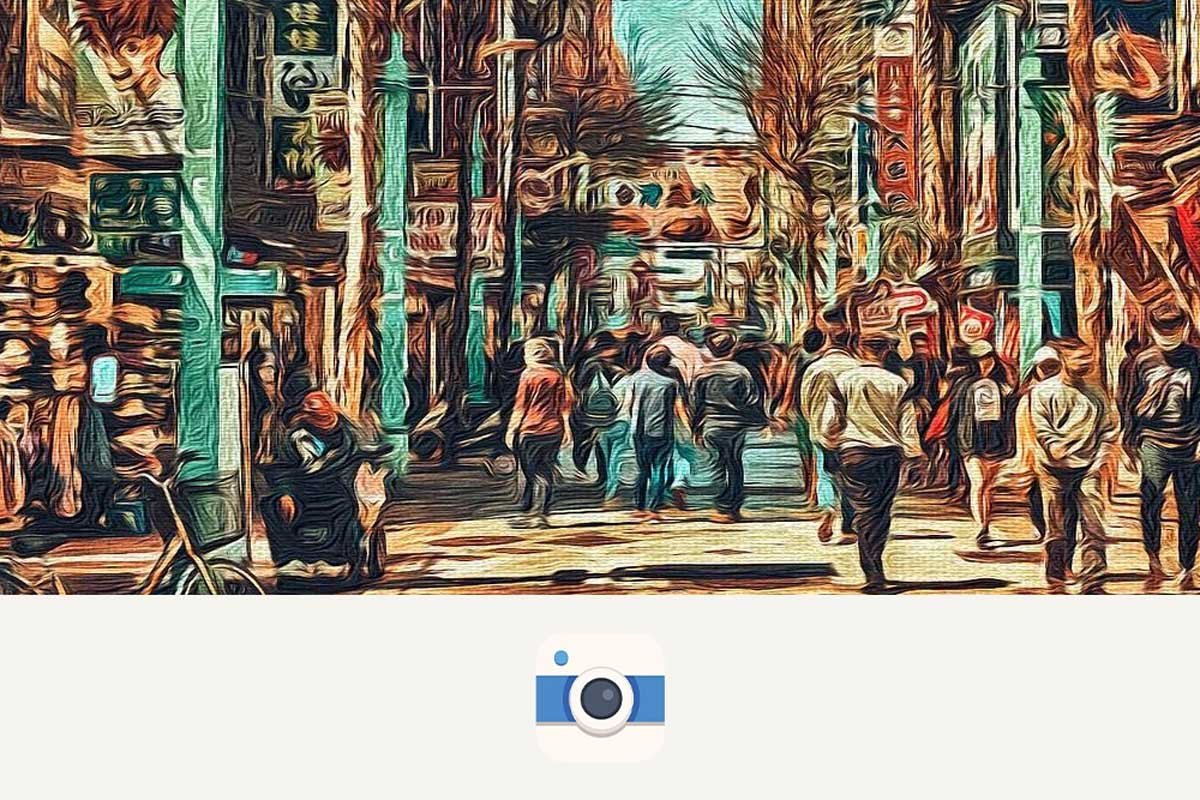
Oil paintings have a classic and expensive look that can make any room feel more sophisticated. You do not need to hire a professional painter to get this look for your home. Digital oil painting tools use software to mimic the look of heavy brushstrokes and layered paint. They analyze the colors and lighting in your photo and apply digital textures that look like real oil on canvas. The result is a piece of art that looks like it took weeks to paint by hand. You can take a simple photo of a landscape or a portrait and turn it into a museum quality piece of art.
Key Features
These tools offer a variety of brush styles and textures. You can choose between thick, impasto strokes or smoother, more blended styles. Many applications allow you to adjust the direction of the brushstrokes to follow the contours of the subject. You can also control the intensity of the paint texture to make it look more or less realistic. Some advanced versions even simulate how light reflects off the ridges of the digital paint.
Pros & Cons
The main advantage is the high quality aesthetic you get without the high cost of a real painting. It is an easy way to create impressive wall art for your home. However, if the digital effect is too strong, it can sometimes make the photo look a bit artificial. It takes a little bit of practice to find the right balance between the original photo and the painting effect.
Best For
This style is best for formal portraits, wedding photos, and beautiful landscape shots. It is the ideal choice for creating large canvas prints for living rooms or offices.
Top 4: Pop Art Effect Generator
Overview
If you want something bold and modern, pop art is the perfect choice. This style was made famous by artists like Andy Warhol and features bright colors and high contrast. It is a great way to add a lot of energy to a photo that might otherwise feel a bit plain. A pop art generator takes your image and reduces it to a few simple colors and shapes. It often uses dots or halftone patterns to add texture and a comic book feel. You can create a single large image or a grid of four images with different color schemes.
Key Features
The standout feature is the vibrant color palette options. You can choose from classic neon combinations or create your own custom set of colors. The tools also include settings for halftone patterns, which are the small dots often seen in old newspaper prints. You can adjust the size of these dots to change the retro feel of the artwork. Most generators also allow you to boost the contrast to make the subject pop against the background.
Pros & Cons
Pop art is very forgiving, which is a big pro. Even a low quality selfie can look like a professional piece of art once the pop art filters are applied. It is also very fun to experiment with different color combinations. The only downside is that it is a very specific style that might not fit in every home. It works best in modern spaces with a lot of color.
Best For
This is best for social media profile pictures, teen bedroom decor, and fun gifts for friends. It is also a great way to stylize photos of pets.
Top 5: Pencil Sketch and Charcoal Tool
Overview
A pencil sketch offers a soft and timeless look that feels very personal. Digital sketch tools can turn a sharp digital photo into something that looks like it was drawn by hand with graphite or charcoal. These tools focus on the edges and shadows to create a sense of depth and emotion. It is a great choice for architectural photos or close-up portraits of children and elderly family members. The final result looks elegant and classic without needing any actual drawing skills. It strips away the distraction of color and lets the viewer focus on the form and expression of the subject.
Key Features
These tools offer different types of lead and paper textures. You can choose a soft 4B pencil look for a dark and moody sketch or a hard H pencil for a light and airy drawing. Some tools also offer a charcoal mode that provides deeper blacks and more smudged textures. You can usually adjust the cross-hatching and shading density to get the exact look you want.
Pros & Cons
The biggest pro is the sophisticated and artistic feel it gives to any photo. It is very easy to use and usually produces great results with just one click. One con is that you lose all the color information, so if the color was the best part of the photo, this might not be the right choice. It also requires a photo with good lighting and clear shadows to look its best.
Best For
This style is best for portraits, historical buildings, and artistic still life photos. It makes for a very thoughtful and classic gift.
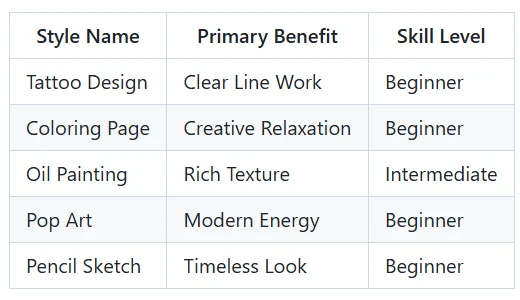
Comparison Summary
Final Recommendation
Choosing the right way to transform your photo depends on what you want to do with the final piece. If you are looking for a way to relax and spend time with your family, you should try making your own coloring pages. It is a simple and fun way to interact with your memories. If you want to create something beautiful to hang on your wall, the oil painting or pencil sketch options are your best bet. They provide a high level of sophistication that looks great in any room.
For those who are thinking about getting new body art, the tattoo generator is a vital tool. It helps you visualize your ideas and gives you a professional stencil to take to your artist. If you want something fun and vibrant for your social media, go with the pop art style. No matter which method you choose, you will be giving your photos a second life. Instead of letting them sit on your phone, you can turn them into something you can enjoy every day. All of these tools are easy to use and allow you to express your creativity without needing years of art school.