A stranger’s face fills the screen. They’re sitting in a bedroom in Seoul, or a cafe in Lisbon, or a dorm room in Michigan. Five seconds ago you clicked a single button. That’s Camsurf — a free random video chat platform that pairs you with a live stranger instantly, no sign-up, no profile, no waiting.

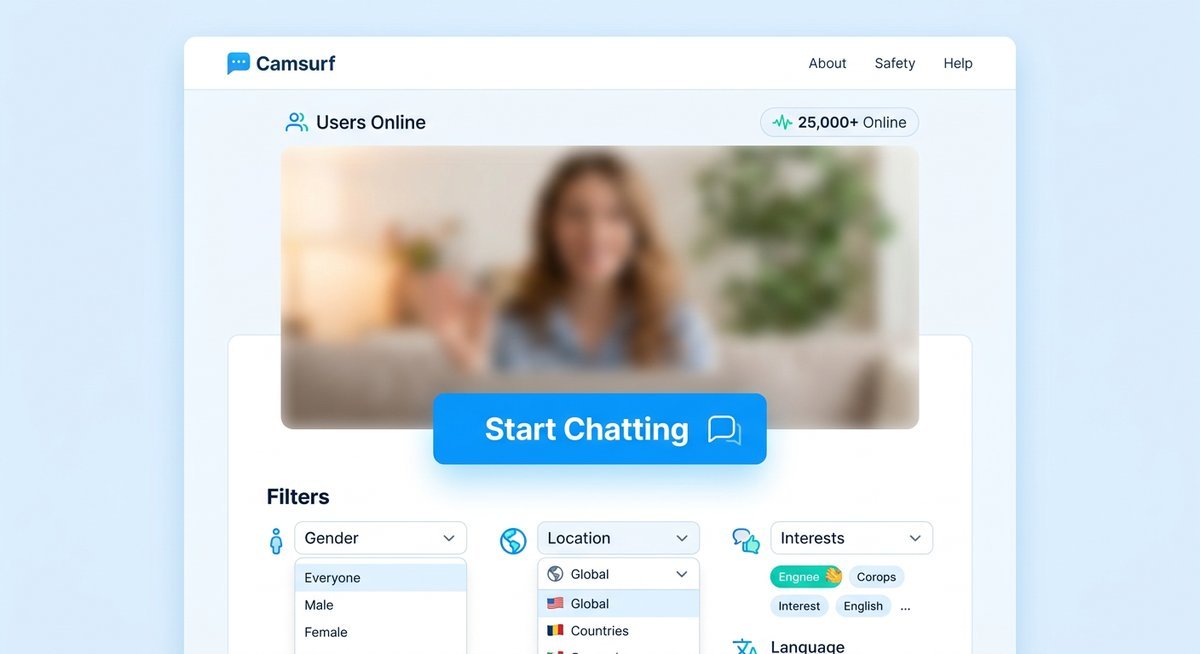
Camsurf random video chat platform interface on desktop and mobile
The pitch is aggressively simple: open the site or app, grant camera access, click Start. Camsurf strips away every layer of friction that bogs down typical social platforms. No algorithms curating your feed. No follower counts. Just raw, unscripted face-to-face conversation with someone you’ve never met.
Below is everything worth knowing — how the platform works, a step-by-step onboarding guide, an honest breakdown of safety and privacy, a head-to-head competitor comparison, and fixes for the technical hiccups that trip up new users.
What Is Camsurf and How Does It Work?
Camsurf is a free, browser-based and mobile random video chat app that connects two strangers via live webcam in under ten seconds, with no registration or personal information required. It launched around 2015 and now serves users in over 200 countries, according to the platform’s homepage.
The Core Concept
You visit camsurf.com or open the app. The browser asks for camera and microphone access. You grant it, hit Start, and the system pulls from a pool of currently active users to pair you with someone — anyone — whose filter settings overlap with yours. If no filters are set, you get whoever is next in the queue. Average time from homepage to live video chat: five to ten seconds on a stable connection.
That zero-friction entry is the whole point. Most stranger chat platforms have drifted toward mandatory registration. Camsurf hasn’t. You can close the tab and no trace of you remains on the platform — no username, no chat history, no profile page lingering after you leave.
Key Features at a Glance
The feature set is deliberately lean. Camsurf covers the essentials without burying first-time users in settings.
| Feature | Details | Free or Premium |
|---|---|---|
| Gender Filter | Match by male, female, or couples | Premium (Camsurf Plus) |
| Country Filter | Limit matches to a specific country | Premium (Camsurf Plus) |
| Language Preference | Set a preferred language for better match relevance | Free |
| Text Chat | Send messages alongside the video feed | Free |
| Skip / Next | Move to a new match with one click | Free |
| Report & Block | Flag inappropriate users mid-session | Free |
| Mobile App | Native apps on Google Play and Apple App Store | Free (with in-app purchases) |
The language preference is a quietly clever feature. It turns Camsurf into a workable tool for language learners who want unstructured conversational practice — not flashcards, not grammar drills, just real talk with a native speaker. Competitors largely ignore this use case.
How to Start Using Camsurf — Step-by-Step
Getting into a Camsurf video chat takes under sixty seconds on both browser and mobile. No email, no account creation, no profile photo — just a working camera and an internet connection. The process differs slightly between platforms.
Using Camsurf on a Browser
Open any modern browser — Chrome, Firefox, Edge, Safari — and go to camsurf.com. The homepage loads directly into the chat interface.
- Your browser will prompt for camera and microphone access. Click Allow. Without this, the video feed stays dead and Camsurf can’t pair you.
- Before hitting Start, check the filter controls near the video window. You can set a language preference for free. Country and gender filters require Camsurf Plus.
- Click Start. The matching algorithm connects you with a stranger, typically within three to eight seconds depending on active user volume.
- You’ll see the stranger’s video feed alongside your own preview. A text chat panel runs next to the video — type, talk, or both.
- Click Next to skip to a new match. Use Report to flag inappropriate behavior before moving on.
A practical tip: have a greeting ready. “Hey, where are you from?” breaks the ice faster than the awkward mutual stare that kills most first connections.
Using the Camsurf App on Mobile
Search “Camsurf” on Google Play or the App Store. The app is lightweight — under 50MB — and installs fast even on slower connections.
- On first launch, grant camera and microphone permissions. Notification access is optional and won’t affect the core video chat experience.
- The home screen shows a single Start Chatting button. Tap it to jump straight into the queue, or hit the settings icon first to configure language and region.
- The mobile UI is more streamlined — the text chat panel stays minimized by default, keeping the video feed front and center. Tap to expand it.
- Tap Next to skip or the flag icon to report.
| Criteria | Browser Version | Mobile App |
|---|---|---|
| Screen layout | Side-by-side video and text | Full-screen video, text overlay |
| Filter access | Visible on main screen | Behind settings icon |
| Best for | Desktop users wanting a larger video window | On-the-go chatting, portrait video |
| Account needed | No | No |
| Download size | N/A (runs in browser) | ~45 MB |
Is Camsurf Safe? Moderation, Privacy, and Data Practices
Camsurf uses a layered safety system — automated AI detection, human moderators, and user-driven reporting — making it meaningfully safer than unmoderated alternatives like the now-defunct Omegle, which shut down in November 2023 partly due to safety concerns. No anonymous video chat platform is risk-free, but Camsurf’s approach places it among the more actively governed options.
How Camsurf Moderates Its Platform
The first layer is automated. Camsurf runs AI-powered content detection that scans video streams in real time for nudity and other policy violations, terminating sessions before a human reviewer needs to step in. In a category where inappropriate content can surface within seconds of connecting, automated detection isn’t optional — it’s the minimum viable safety layer.
Human moderation handles the edge cases. When someone submits an in-chat report, session data routes to a review team. Confirmed violations result in bans tied to device identifiers, not just accounts — making it harder for repeat offenders to cycle back in by clearing cookies.
The report button is visible throughout every session and takes under three seconds to use. Low friction on reporting means more users actually do it, which feeds better data back into the AI detection system over time.
Privacy and Data Policy Explained
Anonymous users provide no email, no username, no password. Video streams are peer-to-peer during the chat and are not recorded or stored after disconnection.
Camsurf does collect technical data for moderation purposes. Here’s what the platform gathers:
| Data Type | Collected? | Purpose |
|---|---|---|
| Email / Name | No (anonymous users) | N/A |
| IP Address | Yes | Moderation, abuse prevention |
| Device Identifier | Yes | Ban enforcement across sessions |
| Video / Audio Stream | No | Not stored or recorded |
| Usage Metadata | Yes | Platform analytics, session matching |
For European users, Camsurf acknowledges GDPR obligations in its privacy policy. The IP collection is a practical trade-off: it enables the moderation infrastructure but means complete anonymity is not guaranteed. Users wanting an extra layer can route through a reputable VPN before starting a session.
Safety Tips for New Users
- Never share personal details. No real name, location, workplace, or school. The anonymity works both ways — protect yours.
- Use the report button liberally. It costs nothing and takes three seconds. Reporting directly improves the platform for everyone.
- Ignore external links. If someone pastes a URL into the text chat, don’t click it. Phishing and malware distribution happen on every anonymous chat platform.
- Keep the app updated. Security patches ship with version updates. Running an outdated build means running with known vulnerabilities.
- Consider a VPN. A VPN masks your IP address from both the platform and your chat partner, adding a layer of privacy Camsurf alone cannot provide.
- Start in a neutral setting. Your background is visible on camera. A blank wall reveals less about you than a bedroom full of personal items.
Camsurf vs. Omegle, Chatroulette, and Emerald Chat
Camsurf, Omegle, Chatroulette, and Emerald Chat all occupy the random video chat category, but they differ sharply on moderation, filters, mobile support, and data practices. Camsurf’s strongest differentiators are active AI moderation paired with a no-account model and native mobile apps — a combination no single competitor fully replicates.
Feature and Safety Comparison Table
| Criteria | Camsurf | Omegle | Chatroulette | Emerald Chat |
|---|---|---|---|---|
| Status | Active | Shut down Nov 2023 | Active | Active |
| Account Required | No | No (was optional) | No | Optional |
| AI Moderation | Yes — real-time | Limited (pre-shutdown) | Yes | Partial |
| Gender Filter | Yes (premium) | No | No | Yes (account needed) |
| Country Filter | Yes (premium) | No | No | Yes |
| Mobile App | Android + iOS | No official app | No official app | No official app |
| Text + Video | Yes | Yes | Video only | Yes |
| GDPR Acknowledged | Yes | N/A (defunct) | Yes | Yes |
| Overall Safety | Moderate–Good | Poor (offline) | Moderate | Moderate |
Where Camsurf Wins — and Where It Falls Short
The native mobile app is a genuine advantage. Chatroulette and Emerald Chat are browser-only experiences on mobile, which means clunkier interfaces and no push notifications. Camsurf’s app is lightweight, rated 4.3 stars on Google Play, and works well on mid-range Android devices.
The moderation infrastructure is above average for this category. Omegle’s lack of meaningful moderation was a direct factor in its shutdown. Chatroulette improved significantly after requiring phone verification, but that added friction Camsurf avoids.
Where Camsurf loses ground: premium filters. Gender and country filters sit behind a paywall, while Emerald Chat offers both for free with an account. For users who specifically want to filter by region or gender, that’s a real cost. Chatroulette also has no text chat — for some users that’s a dealbreaker, for others it’s irrelevant.
Troubleshooting Common Camsurf Issues
Most Camsurf problems are browser permission errors or network hiccups, not platform bugs. The fixes below cover what users actually run into.
Camera or Microphone Not Working
This is the single most common complaint, and the fix is almost always a browser permission issue rather than anything wrong with Camsurf itself.
- Check browser permissions. Click the lock icon in your browser’s address bar. Verify that camera and microphone are both set to “Allow” for camsurf.com.
- Close competing apps. Zoom, Skype, Discord, and Google Meet can lock your camera. If another app is using the webcam, Camsurf can’t access it. Close everything else first.
- Try a different browser. Chrome handles WebRTC (the technology behind browser-based video chat) most reliably. If you’re on Safari or Firefox and hitting issues, switch to Chrome as a diagnostic step.
- On mobile: Go to Settings > Apps > Camsurf > Permissions and confirm camera and microphone are enabled. Restarting the app after granting permissions sometimes forces the refresh.
Connection Drops and Slow Matching
Slow matching usually means low active user volume in your selected region or time zone — not a platform outage. Try removing country or language filters temporarily to access the full global user pool.
For mid-session disconnections:
- Switch to a wired connection if you’re on Wi-Fi. Packet loss on wireless networks is the most common cause of video chat drops.
- Disable your VPN temporarily. Some VPN servers add latency that disrupts the peer-to-peer video connection. If the problem resolves without the VPN, try switching to a server geographically closer to you.
- Clear browser cache for camsurf.com and reload. Cached scripts from older versions occasionally cause session handling errors.
Frequently Asked Questions
Is Camsurf completely free?
The core random video chat experience is free — no account, no payment, no trial period. Camsurf Plus is an optional paid tier that unlocks gender and country filters. Everything else, including text chat, skip, report, and the mobile app, costs nothing.
Is Camsurf a good Omegle alternative?
For users who valued Omegle’s anonymous, no-registration model, Camsurf is one of the closest functional replacements still operating. It adds active AI moderation that Omegle never consistently provided, plus native mobile apps that Omegle lacked entirely. The main trade-off is that Camsurf gates some filters behind its premium tier.
What is the minimum age to use Camsurf?
Camsurf’s terms of service require users to be at least 18 years old. There is no formal age verification process beyond agreeing to the terms — similar to most platforms in this category. Parents concerned about underage access should use device-level parental controls.
What happens if I get banned on Camsurf?
Bans are tied to device identifiers and IP addresses. If you’re banned, the platform blocks reconnection from that device and network. Bans can result from user reports, AI detection of policy violations, or manual moderation decisions. Temporary bans lift after a cooldown period; permanent bans do not have a publicly documented appeal process.
Are Camsurf video chats recorded?
Camsurf states that video streams are not recorded or stored by the platform. The connection is peer-to-peer during the session. That said, there is no technical barrier preventing the other person from using screen recording software on their end — a reality on every live video platform, not unique to Camsurf.
Can I use Camsurf to practice a foreign language?
Yes, and it works better for this than most dedicated language exchange apps. Set your preferred language in the filter settings, and Camsurf prioritizes matching you with speakers of that language. The conversations are unscripted and unpredictable — exactly the kind of immersion that structured lessons can’t replicate.
Why am I not getting any matches on Camsurf?
Low match rates are usually caused by restrictive filters or low user volume at your current time. Remove country and gender filters, try chatting during evening hours in North America or Europe (peak global activity), and confirm your camera is active — Camsurf deprioritizes users with inactive video feeds.
Camsurf occupies a specific niche well: anonymous, fast, moderated random video chat that works on both desktop and mobile without demanding anything from the user upfront. It won’t replace a social network, and it’s not trying to. For the millions of people who just want a spontaneous face-to-face conversation with a stranger somewhere on the planet, it does exactly that — in about five seconds flat.