FanPass is a legitimate, operational ticket resale marketplace — not a scam. Real tickets change hands on the platform every day, and the company has a verifiable trading history, registered business details, and an active presence on Trustpilot with thousands of reviews.

is fan pass legit — Is FanPass Legit? An Honest Review for 2025
Still, handing over real money for a resale ticket is a different kind of trust exercise than buying direct from a box office. The seller is a stranger. Delivery might be days before the match. The fee at checkout is higher than the listed price. These are reasonable things to worry about.
So the question isn’t just whether FanPass is legit in the broadest sense — it’s whether it’s safe for your specific purchase. That depends on understanding how the buyer guarantee actually works in practice, what the fee structure looks like before you commit, how ticket delivery timelines play out, and where FanPass sits relative to its competitors. All of that follows.
What Is FanPass and How Does It Work?
FanPass is a secondary ticket marketplace that connects sellers with buyers — and it does not own or issue any tickets itself. Every listing on the platform comes from a third-party seller, and FanPass sits in the middle as the intermediary, handling payment, communication, and buyer protection. Understanding this peer-to-peer model is key to evaluating the platform’s legitimacy.
The Marketplace Model Explained
FanPass operates on a peer-to-peer resale model. A seller lists their tickets at a price they set, a buyer purchases them, and FanPass facilitates the transaction — collecting payment, verifying the order, and coordinating delivery. The platform never holds physical inventory and has no affiliation with the original event organiser or box office.
This distinction matters. Prices on FanPass reflect market demand, not face value. A sold-out Premier League fixture or a Champions League knockout tie can list at multiples of the original ticket price, depending on scarcity and timing.
Who Sells on FanPass?
The seller base is a mix of individual fans offloading tickets they can no longer use, season-ticket holders with surplus seats, and professional resellers who trade tickets at volume. FanPass requires sellers to go through a verification process before their listings go live — a basic safeguard that filters out the most obvious bad actors.
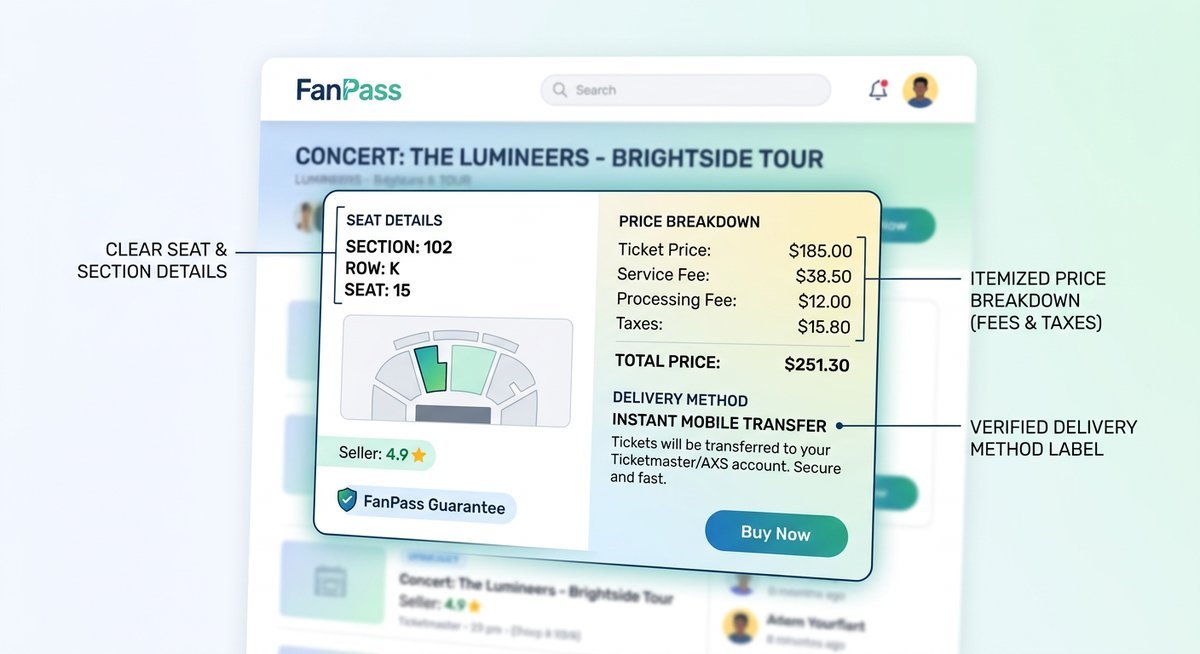
Before completing a purchase, buyers can see the seat block and row, the listed delivery method (e-ticket or physical), and the total price including any applicable fees. What buyers cannot always see in advance is whether the ticket carries the seller’s name — a detail that becomes relevant at certain venues and is worth checking in the listing description before checkout.
| Seller Type | Typical Listings | Common Delivery Method |
|---|---|---|
| Individual fan | One-off events, single or pair of seats | E-ticket or mobile transfer |
| Season-ticket holder | Regular fixtures, consistent seat location | E-ticket or physical post |
| Professional reseller | High-demand events, multiple seat options | E-ticket (typically faster) |
Is FanPass Legit? What the Reviews and Data Say
FanPass holds a “Great” rating on Trustpilot — scoring around 4.1 out of 5 stars based on several hundred verified reviews. The volume matters as much as the score: a platform with only a handful of reviews can be gamed easily, but a sustained rating across hundreds of transactions is considerably harder to fake. The pattern of feedback is consistent enough to draw real conclusions.
Trustpilot Ratings and Review Patterns
Positive reviews cluster around two themes: smooth ticket delivery and responsive customer service. Buyers who received e-tickets well ahead of match day tend to leave five-star reviews almost reflexively — the anxiety of waiting dissolves the moment the PDF lands in the inbox. Customer service responsiveness is specifically called out, with multiple reviewers noting that support agents replied within hours rather than days.
The criticisms are more specific. Late delivery — particularly for physical tickets dispatched close to the event — appears repeatedly, and it is a legitimate operational concern rather than an isolated complaint. Name-on-ticket anxiety is the second most common theme: buyers notice the ticket bears the seller’s name and panic, even when this is entirely normal for the venue in question. Service fees also surface as a frustration, with some buyers reporting the final checkout price was noticeably higher than the listed price.
None of these complaints, taken individually, suggest fraud. They suggest friction — which is a meaningfully different problem.
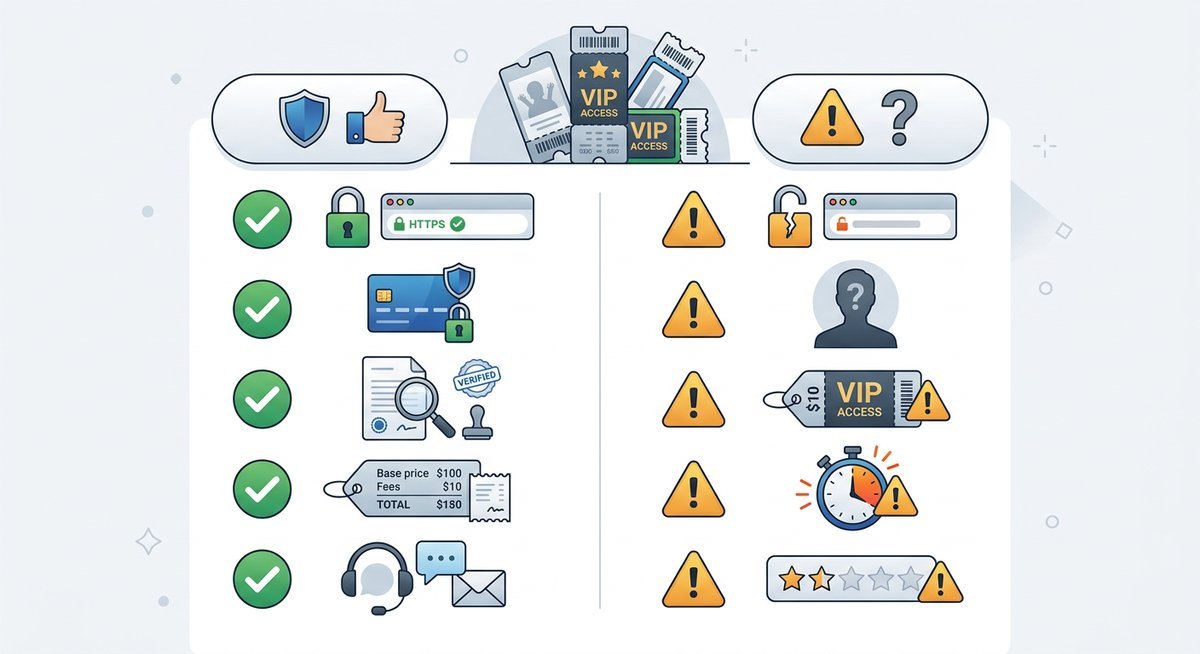
Red Flags vs. Reassuring Signals
| Reassuring Signals | Legitimate Concerns |
|---|---|
| Operational since 2013 — over a decade in the secondary ticket market | Last-minute delivery anxiety, especially for physical tickets |
| Verifiable company registration (FanPass Ltd, Companies House, UK) | Service fees can push final price 20–30% above listed ticket price |
| Active Trustpilot presence with company responses to negative reviews | Name-on-ticket confusion causes unnecessary buyer panic |
| Published buyer guarantee covering invalid or undelivered tickets | Guarantee terms are not benchmarked against rivals — hard to evaluate in isolation |
| Publicly listed contact channels and support infrastructure | No independent escrow or third-party verification of seller credentials visible to buyers |
The most telling reassuring signal is FanPass’s habit of publicly responding to negative Trustpilot reviews — platforms running a short-term scam operation do not invest in reputation management. A decade of continuous operation is equally hard to dismiss. Fly-by-night ticket fraud sites rarely survive twelve months before regulatory pressure or chargebacks shut them down.
The fee transparency gap is the most actionable concern. Unlike StubHub, which displays an “all-in” pricing toggle, FanPass surfaces the full cost only at checkout — a design choice that consistently surprises buyers and drives negative reviews that have nothing to do with ticket validity. That is a UX problem, not a legitimacy problem, but the distinction is worth knowing before you reach the payment screen.
FanPass Buyer Guarantee and Refund Process Explained
FanPass’s buyer guarantee covers three core failure scenarios — non-delivery, invalid tickets at the gate, and significantly wrong seats — and promises a full refund in each case. What it does not cover is equally important to understand before you buy. Knowing both sides of that promise is the difference between a confident purchase and an expensive surprise.
What the FanPass Guarantee Actually Covers
The core promise is straightforward: if the tickets you receive don’t do the job they were sold to do, FanPass will refund you. That protection applies when tickets fail to arrive before the event, when they are rejected as invalid at the venue entrance, or when the seats delivered are materially different from what was listed — a different stand, a restricted-view seat sold as full-view, that kind of discrepancy.
The guarantee does not extend to every unhappy outcome, though. If the event itself is cancelled or postponed, your recourse runs through the event organiser, not FanPass. Seller fees and service charges may also fall outside the refundable amount depending on the circumstances.
| Scenario | Covered by Guarantee? |
|---|---|
| Tickets never delivered before the event | Yes — full refund |
| Tickets rejected as invalid at the gate | Yes — full refund |
| Seats significantly different from listing | Yes — full refund |
| Event cancelled or postponed by organiser | No — contact event organiser |
| Name-on-ticket issue disclosed at purchase | No — buyer accepted known condition |
| Buyer changes mind after purchase | No — all sales are final |
Step-by-Step: What to Do If Your Tickets Don’t Arrive
Acting quickly matters here — waiting until you’re standing outside the stadium is too late. FanPass support needs to be contacted before the event starts for a dispute to be considered valid.
- Check your email confirmation and FanPass account dashboard. E-tickets are frequently delivered to the email address used at checkout, and the dashboard often reflects delivery status in real time. A missing email is sometimes a spam filter issue, not a seller failure.
- Contact FanPass customer support with your order number. Use the official support channel on the FanPass website — not social media. Have your order number, event details, and purchase confirmation ready. The earlier you contact them relative to the event, the more options they have.
- Escalate through the official dispute channel. If the initial support contact doesn’t resolve the issue, formally raise a dispute through FanPass’s resolution process. Document every exchange — timestamps and reference numbers included.
- Initiate a chargeback with your card provider if unresolved. If FanPass fails to deliver a remedy before the event, most major card providers allow a chargeback claim under “item not received.” Realistically, chargeback resolutions can take 30–45 days, so this is a financial backstop, not a same-day fix.
Ticket Name Mismatches — A Common Concern
Seeing a stranger’s name on your ticket is one of the most common sources of pre-event panic among FanPass buyers. Most football and concert venues in Europe do not enforce name-matching on resale tickets — the barcode is what gets scanned, not the printed name. Exceptions exist, though: some clubs (notably for high-security derbies or international tournaments) do require ID matching at the gate.
FanPass listings that involve name-sensitive tickets should disclose this upfront. If the listing doesn’t mention name restrictions, contact FanPass support before buying and ask directly. Five minutes of due diligence is cheaper than standing at the turnstile with an invalid ticket.
FanPass Fees, Pricing, and Delivery Timelines
FanPass charges a 15–25% service fee on top of the seller’s listed price, meaning a ticket listed at $100 can realistically cost $120–$125 at checkout once fees and potential currency conversion are factored in. Delivery timelines range from minutes (e-tickets) to 3–5 business days (physical). Knowing both numbers before you buy eliminates the most common source of checkout surprise.
Understanding the Full Cost
The listed price on FanPass is the seller’s asking price, not your final cost. A booking fee is applied at checkout, and depending on your location and payment method, currency conversion charges from your card provider can add another 1–3%.
| Cost Component | Typical Range | Notes |
|---|---|---|
| Seller listing price | Varies | Set by the individual seller |
| FanPass service fee | 15–25% | Applied at checkout |
| Currency conversion | 1–3% | Card-provider dependent |
| Delivery charge | €0–€10 | Usually free for e-tickets |
E-tickets are the most common delivery format and typically arrive within minutes to 24 hours of purchase. Physical tickets, where still offered, can take 3–5 business days — a genuine risk if you’re buying within a week of the event.
Last-Minute Purchase Risk
Buying within 48 hours of kick-off is where delivery anxiety peaks. In practice, most last-minute FanPass orders are e-ticket only, and sellers are contractually obligated to transfer them promptly. A safe rule: if the listing shows physical delivery and the event is under five days away, look for an alternative listing or platform.
One concrete detail worth knowing — FanPass displays the delivery method on every listing before you commit to purchase. Checking that field takes five seconds and can save a significant headache.
FanPass vs StubHub, Viagogo, and Other Alternatives
FanPass is not the only secondary ticket marketplace, and comparing it against the major alternatives reveals where it genuinely competes and where it falls short. StubHub, Viagogo, and LiveFootballTickets all serve the same core function — connecting buyers with resale tickets — but their fee structures, buyer protections, and delivery reliability differ meaningfully.
Platform Comparison
| Feature | FanPass | StubHub | Viagogo | LiveFootballTickets |
|---|---|---|---|---|
| Service fee range | 15–25% | 10–25% (all-in toggle available) | 15–30% | 10–20% |
| Buyer guarantee | Full refund for invalid/undelivered tickets | FanProtect guarantee (replacement or refund) | Refund or replacement | 150% money-back guarantee |
| Trustpilot rating | ~4.1/5 | ~4.4/5 | ~1.6/5 | ~4.5/5 |
| Fee transparency | Fees shown at checkout only | All-in pricing option | Fees shown at checkout only | Fees included in listed price |
| Primary delivery method | E-ticket + physical | E-ticket + mobile transfer | E-ticket + physical | E-ticket + physical |
| Years in operation | Since 2013 | Since 2000 | Since 2006 | Since 2012 |
StubHub’s all-in pricing toggle is the clearest advantage any rival holds over FanPass — it eliminates the checkout surprise that drives so many negative reviews. Viagogo, despite being widely known, carries a significantly lower trust rating and a long history of regulatory complaints across multiple countries. LiveFootballTickets offers a stronger guarantee on paper (150% money-back), though its inventory is narrower and focused primarily on European football.
FanPass occupies the middle ground: more trustworthy than Viagogo by a wide margin, slightly less transparent on pricing than StubHub, and competitive with LiveFootballTickets for football-specific events. For buyers who already have a FanPass listing in mind, the platform is a reasonable choice — just verify the total cost at checkout before confirming.
Frequently Asked Questions
Is FanPass a scam?
No. FanPass is a registered UK company (FanPass Ltd, Companies House) that has been operating since 2013. It holds a 4.1-star rating on Trustpilot across hundreds of verified reviews. While individual transactions can go wrong — as with any resale marketplace — the platform itself is not fraudulent.
Does FanPass give refunds?
Yes, under specific conditions. FanPass’s buyer guarantee covers tickets that are never delivered, rejected as invalid at the venue, or significantly different from the listing description. Refunds are not available for buyer’s remorse, event cancellations (handled by the organiser), or name-on-ticket issues that were disclosed before purchase.
Why are FanPass tickets so expensive?
Prices on FanPass are set by individual sellers based on market demand, not face value. A sold-out event will carry a premium. On top of the seller’s price, FanPass adds a 15–25% service fee at checkout, plus potential currency conversion charges from your card provider. The total can be 25–40% above the original ticket price for high-demand events.
How long does FanPass take to deliver tickets?
E-tickets typically arrive within minutes to 24 hours. Physical tickets can take 3–5 business days. For last-minute purchases (under 48 hours before the event), only e-ticket listings are practical — avoid physical delivery options at that stage.
Is it safe to buy Premier League tickets on FanPass?
Generally yes, though caution is warranted. Most Premier League clubs scan barcodes at the gate rather than matching names. Season-ticket holders regularly resell individual match tickets through platforms like FanPass. Check whether the specific club enforces name-matching policies before purchasing, and always opt for e-ticket delivery when buying close to match day.
What happens if my FanPass tickets have the wrong name?
Most venues accept tickets regardless of the printed name — the barcode is what matters at the scanner. Some high-security events or specific clubs require ID matching. If the listing discloses a name restriction and you proceed with the purchase, FanPass’s guarantee does not cover that scenario. When in doubt, contact FanPass support before buying.
How does FanPass compare to StubHub?
StubHub is larger, offers all-in pricing transparency, and carries a slightly higher Trustpilot rating (4.4 vs 4.1). FanPass is competitive for European football events specifically and has operated reliably since 2013. StubHub’s FanProtect guarantee also offers replacement tickets as an option, not just refunds.
Can I sell tickets on FanPass?
Yes. FanPass allows verified sellers to list tickets. Sellers set their own price, and FanPass handles payment processing and buyer communication. A verification process is required before listings go live. Seller fees are deducted from the sale proceeds.
Final Verdict
FanPass is a legitimate ticket resale platform with over a decade of operation, a functional buyer guarantee, and a Trustpilot rating that reflects genuine — if imperfect — customer satisfaction. It is not a scam, but it is also not without friction: service fees are higher than some competitors, pricing transparency could improve, and physical ticket delivery timelines can cause genuine stress.
For buyers, the practical advice is straightforward. Choose e-ticket delivery whenever possible. Check the total cost at checkout before confirming. Contact support early if anything looks wrong. And if you’re comparing platforms, weigh FanPass against StubHub and LiveFootballTickets — each has trade-offs worth understanding for your specific event and budget.