Birthdays are personal. A generic “Happy Birthday” text just doesn’t cut it anymore — not when you can create something that genuinely moves someone, something they’ll want to watch again and share with everyone they know. The good news is that creating a stunning, personalized birthday video no longer requires video editing experience, expensive software, or hours of your time. AI has changed the game completely, and this guide walks you through exactly how to make AI birthday video content that feels thoughtful, cinematic, and completely unique.
Why AI Birthday Videos Hit Differently
There’s a reason handmade gifts carry more emotional weight than store-bought ones — they signal effort and intention. A personalized birthday video does the same thing, but AI makes the “effort” part surprisingly manageable. Instead of spending a weekend learning Adobe Premiere or paying a freelancer hundreds of dollars, you can produce something genuinely impressive in an afternoon with nothing but a browser and a few good photos.
AI video tools have advanced to the point where they can animate still photos, generate cinematic scenes from text descriptions, add music, sync voiceovers, and apply professional-grade visual effects — all without requiring any technical skill from the person using them. The output quality has crossed a threshold where these videos don’t look like amateur productions. They look intentional, polished, and personal.
What You Need Before You Start
Before jumping into any AI video editor, spend five minutes gathering your materials. The better your inputs, the better your output will be.
Photos of the birthday person are the most important asset. Collect a mix — childhood photos, recent photos, candid moments, group shots with people who matter to them. Aim for at least eight to ten images if you want a video with real narrative flow. Higher resolution photos will produce cleaner animated results.
A general idea of the tone you want helps enormously. Is this a heartfelt, emotional tribute? A fun, upbeat celebration? A roast-style humor piece? Knowing the tone before you start shapes every creative decision that follows.
Any audio you want to include — a favorite song, a voice message from a friend, or a recorded speech — should be ready to upload. Many AI tools accept standard audio file formats, so MP3 or WAV files work fine.
Step-by-Step: How to Make AI Birthday Video Using Pollo AI
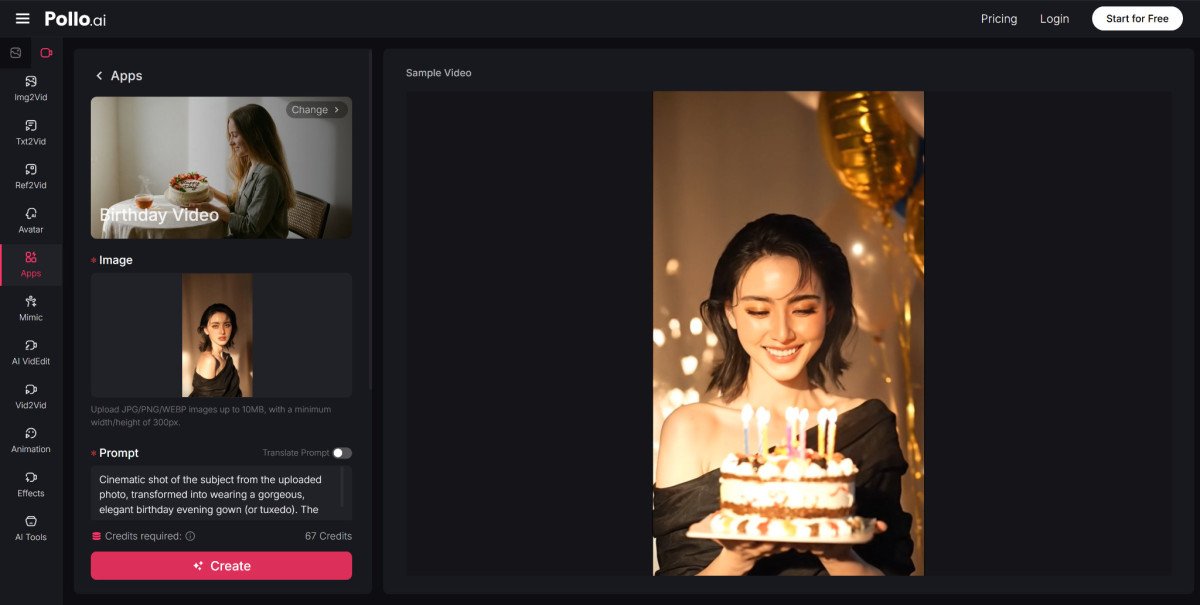
When it comes to accessible, powerful AI video creation, Pollo AI stands out as one of the best platforms for this kind of project. It brings together multiple top-tier AI video generation models in one place, offers a clean and beginner-friendly interface, and holds a strong 4.4 trust score on Trustpilot — meaning real users consistently find it reliable and worth their time. Here’s how to use it to create a personalized birthday video from scratch.
Step 1: Create a free account. The sign-up process takes less than two minutes. Once you’re in, you’ll have access to a suite of AI video tools including a dedicated birthday video maker without needing to navigate multiple platforms or manage separate subscriptions.
Step 2: Choose your creation method. Pollo AI supports both text-to-video and image-to-video generation. For a birthday video built around real photos, start with the image-to-video feature. Upload your first photo and write a short prompt describing the motion or mood you want — something like “gentle zoom in, warm golden light, cinematic and emotional” works well for a heartfelt tone.
Step 3: Generate clips for each photo. Work through your collection of images one by one, generating a short animated clip for each. Keep your prompts consistent in style and mood so the final video feels cohesive rather than disjointed. Each clip will typically run between five and ten seconds, which is the right length for a montage-style birthday video.
Step 4: Assemble and add audio. Once your clips are generated, bring them together using Pollo AI’s online video editing tool or a simple free editor like CapCut or Clipchamp if you prefer more manual control over sequencing. Add your chosen music track, adjust the clip order to tell a story, and layer in any voiceover or personal audio messages you’ve collected.
Step 6: Export and share. Download your finished video in the resolution that suits your sharing platform — high resolution for a TV slideshow at the party, compressed for easy sharing via WhatsApp or Instagram.
Tips for Making Your Birthday Video Feel More Personal
The difference between a good AI birthday video and a great one usually comes down to the personal details layered on top of the AI-generated foundation.
Write a short script before you start generating clips. Even three or four sentences that capture what this person means to you, a favorite memory, or a wish for their year ahead will give your video a narrative backbone that makes it feel intentional rather than random.
Include people they love. Reach out to a few close friends or family members and ask them to record a five-second video message on their phone. Drop these clips into the sequence between your AI-generated scenes. The mix of AI polish and raw human warmth creates a combination that’s genuinely hard to watch without feeling something.
Match the music to the person, not the occasion. Everyone uses “Happy Birthday” tracks. A song that actually means something to the birthday person — their favorite artist, a track from a meaningful moment in their life — transforms the emotional register of the entire video.
Keep it under three minutes. The sweet spot for a personalized birthday video is somewhere between ninety seconds and two and a half minutes. Long enough to feel substantial, short enough to hold attention from start to finish.
Using an AI Video Editor for More Control
If you want to go beyond basic clip generation and have more precise control over transitions, timing, text overlays, and color grading, pairing your AI-generated clips with a dedicated AI video editor is the move. You can bring your generated clips into these editors, fine-tune the sequencing, add animated text overlays with the birthday person’s name, and apply color grades that give the whole video a unified, cinematic look.
This two-step workflow — generate with Pollo AI, refine with an AI video editor — gives you the best of both worlds: the creative power of generative AI and the precise control of a proper editing environment, without requiring professional-level skills in either.
Final Thoughts
Creating a personalized birthday video with AI is one of those rare situations where the technology genuinely makes something better, not just easier. The bar for what you can produce without any prior video experience has risen dramatically, and the result is a gift that carries real emotional weight — something far more memorable than anything you could order online and ship to someone’s door.
Whether you’re making something for a parent’s milestone birthday, a best friend’s big celebration, or a colleague who deserves more than a card, the process is simpler than you think. Start with good photos, use a platform like Pollo AI to make AI birthday video content that looks genuinely impressive, and add the personal details that only you know. That combination is what turns a video into a memory.